
Filing Clerk Duties in Legal Offices: A Daily Guide
November 16, 2026 · 12 min read · Five Star Placements
Table of contents
An attorney needs a signed document for a hearing, the paper folder isn't on its shelf, and the scanned copy has a name nobody recognizes. You may be the person trying to find it, or the manager wondering how to prevent the scramble. Filing clerk duties address that problem before it becomes urgent: keeping records identifiable, accessible to the right people, and traceable from receipt through final disposition.
Table of Contents
- Filing Clerk Duties in a Legal Office at a Glance
- How to Run a Filing Shift Step by Step
- Docketing and Filing Checks That Prevent Errors
- Retention, Access and Confidentiality Controls
- Which Tasks Automation Is Taking Over and What Skills Follow
- Deciding Whether the Filing Clerk Role Fits You
Filing Clerk Duties in a Legal Office at a Glance
| Duty group | What it involves | Example in a legal office |
|---|---|---|
| Intake and stamping | Receive, stamp and date incoming documents | Stamping a filed motion with the date it was received |
| Classification and indexing | Assign file numbers, codes and matter identifiers | Assigning a matter number to a new client letter |
| Filing and storage | Place documents by alphabetical, numerical or chronological rules | Filing deposition transcripts by matter, then by date |
| Retrieval and tracking | Locate files for authorized users and log removals | Logging a file checked out to a partner |
| Scanning and uploading | Digitize paper and load it into the document repository | Scanning a signed contract into the matter folder |
| Inspection and reconciliation | Check placement and match contents to the docket | Comparing a matter file against its docket sheet |
| Retention and disposition | Move or destroy records only under the schedule | Sending a closed matter file to inactive storage |
The U.S. Bureau of Labor Statistics describes file clerks as maintaining paper or electronic records, entering and retrieving data, organizing records, and filing documents. Scanning and uploading are part of the work where employers use electronic filing systems. That description is broader than keeping shelves neat.
What records control means in practice
Records control means knowing what a document is, where it belongs, who may use it, and what has happened to it. A matter is the client assignment or legal issue under which the office groups related records. An index is the searchable information used to locate those records, such as matter number, document type and date.
Consider intake. When a clerk stamps a motion with its received date, that stamp documents arrival at the office. It doesn't, by itself, prove that the court accepted the motion or that another party received it.
Retrieval needs similar precision. If a partner borrows a paper file, the clerk records the borrower and location rather than leaving an unexplained gap on the shelf. The next person can locate the file without searching desks.
Practical rule: A record isn't under control simply because someone knows where it is. An authorized colleague must be able to find it using the office's system.
The tools changed, but the purpose didn't
Earlier filing work centered on cabinets, boxes, bins and drawers. Today, the same classification logic operates through scanners, databases and document-management systems, which store documents with searchable descriptions and access controls.
O*NET's file-clerk task framework lists 19 duties, covering physical storage alongside computer entry, tracking, inspections and authorized removal of outdated material. Moving a closed matter to inactive storage, for example, requires a recorded storage location and approval under the applicable procedure, not just an empty box.
For hiring managers, the duty groups distinguish a basic filing assignment from a broader records-control position. For candidates, they show why accuracy, discretion and follow-through matter as much as organization.
How to Run a Filing Shift Step by Step
A dependable shift follows the same sequence even when documents arrive through different channels. Use the office's approved intake log, whether that's a document-system queue or a controlled spreadsheet, rather than keeping a private list nobody else can access.
This process overview highlights the handoffs where mistakes commonly occur.
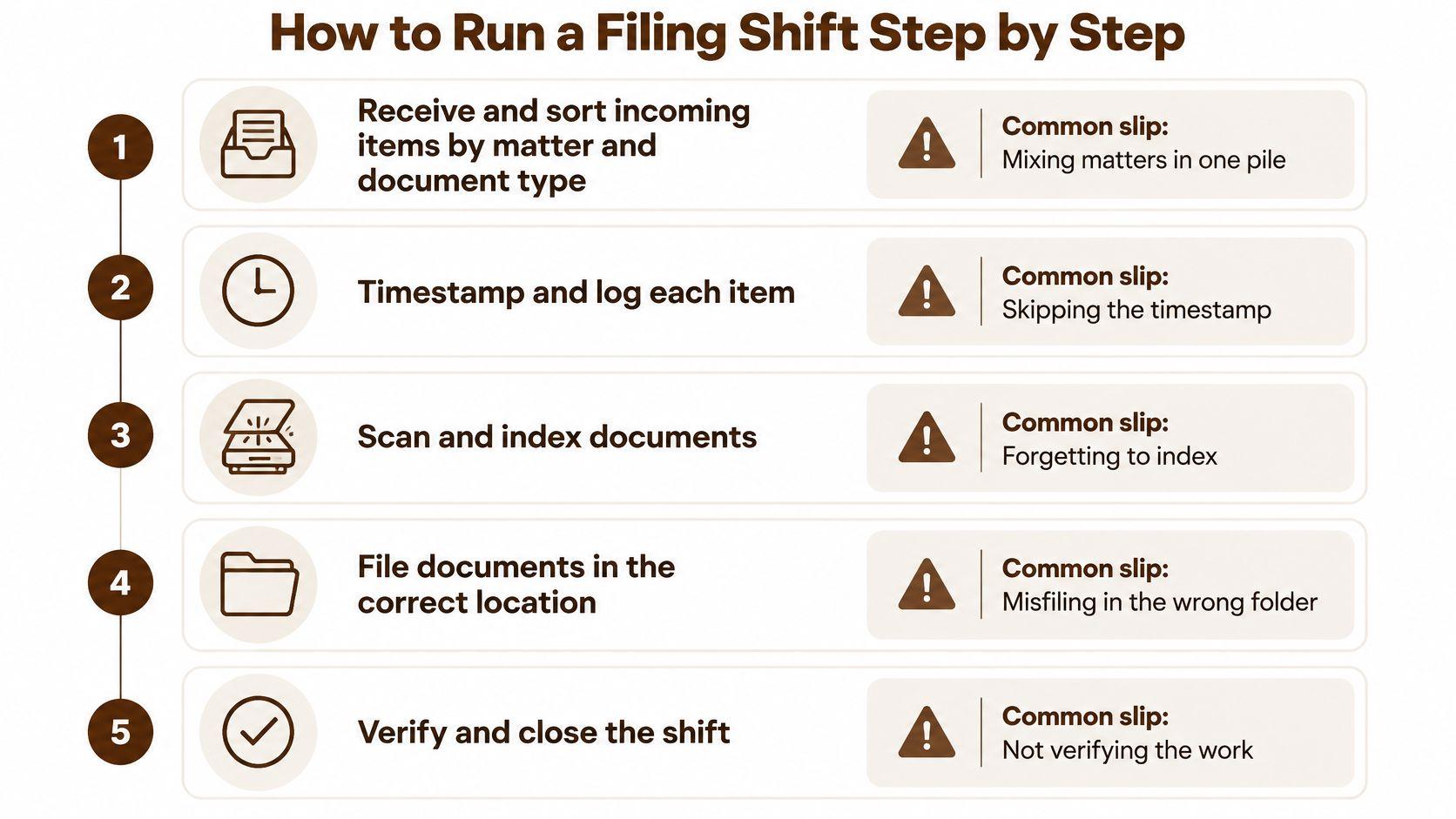
From receipt to confirmed location
-
Receive and sort incoming items by matter and document type. Separate correspondence, contracts, transcripts and court papers without separating their attachments. Mixing unrelated matters in a single working pile makes it easy to place the right document in the wrong folder.
-
Stamp each item with its received date and open its log entry. For electronic items, preserve the receipt information through the approved system. Start the entry before processing so an interruption doesn't leave an undocumented document on your desk.
-
Assign the matter number and document code. Confirm the identifier against the matter list rather than guessing from a client's surname. A document code identifies its category, such as correspondence or deposition transcript, and must be ready before upload.
-
Scan and upload electronic copies, or place physical items in sequence. Check page order, legibility, orientation and attachments before completing the upload. Scanning without filling in the indexing fields creates a digital document that may be difficult to retrieve.
-
Close the log entry with the filed location and note any removal. Record the folder path or physical location clearly enough for another clerk to follow it. If someone takes the file immediately, enter that checkout rather than treating the handoff as an informal favor.
-
Confirm removed files are returned or have an accountable location. Check outstanding loans and contact borrowers. Don't mark a file returned when it's still in a desk drawer or awaiting collection.
Test retrieval before leaving
Say a late-day batch of deposition scans is uploaded without document codes. The files exist, but the attorney's transcript search doesn't find them before the next morning's hearing. Opening a sample upload through the normal search interface would expose the missing indexing before the clerk leaves.
Uploading is a processing step. Finding the document again is the test.
Aim to finish with no unexplained backlog, a log entry for every received item, and an accountable location for every removed file. If unfinished work remains, hand over its status, owner and urgency explicitly. A clean desk isn't proof of a completed shift, but a reconciled intake queue is a useful check.
Docketing and Filing Checks That Prevent Errors
Court filing involves more than adding documents to an internal matter folder. A docket is the court's chronological record of case activity, and an incorrect entry can affect routing, retrieval and deadline tracking.
The U.S. Courts' description of clerk responsibilities includes reviewing incoming documents, assigning case numbers, opening matters, docketing initiating events and routing accepted filings. In federal electronic practice, Case Management/Electronic Case Files, usually called CM/ECF, supports the official case record. These court-clerk functions shouldn't be assumed to belong to every law-firm filing clerk.
A wrong party name or case number can send a filing down the wrong route. A vague description can make the correct document difficult to identify, while an incorrect event selection can leave related filings disconnected.
Use the overview as a prompt, then verify the underlying document.
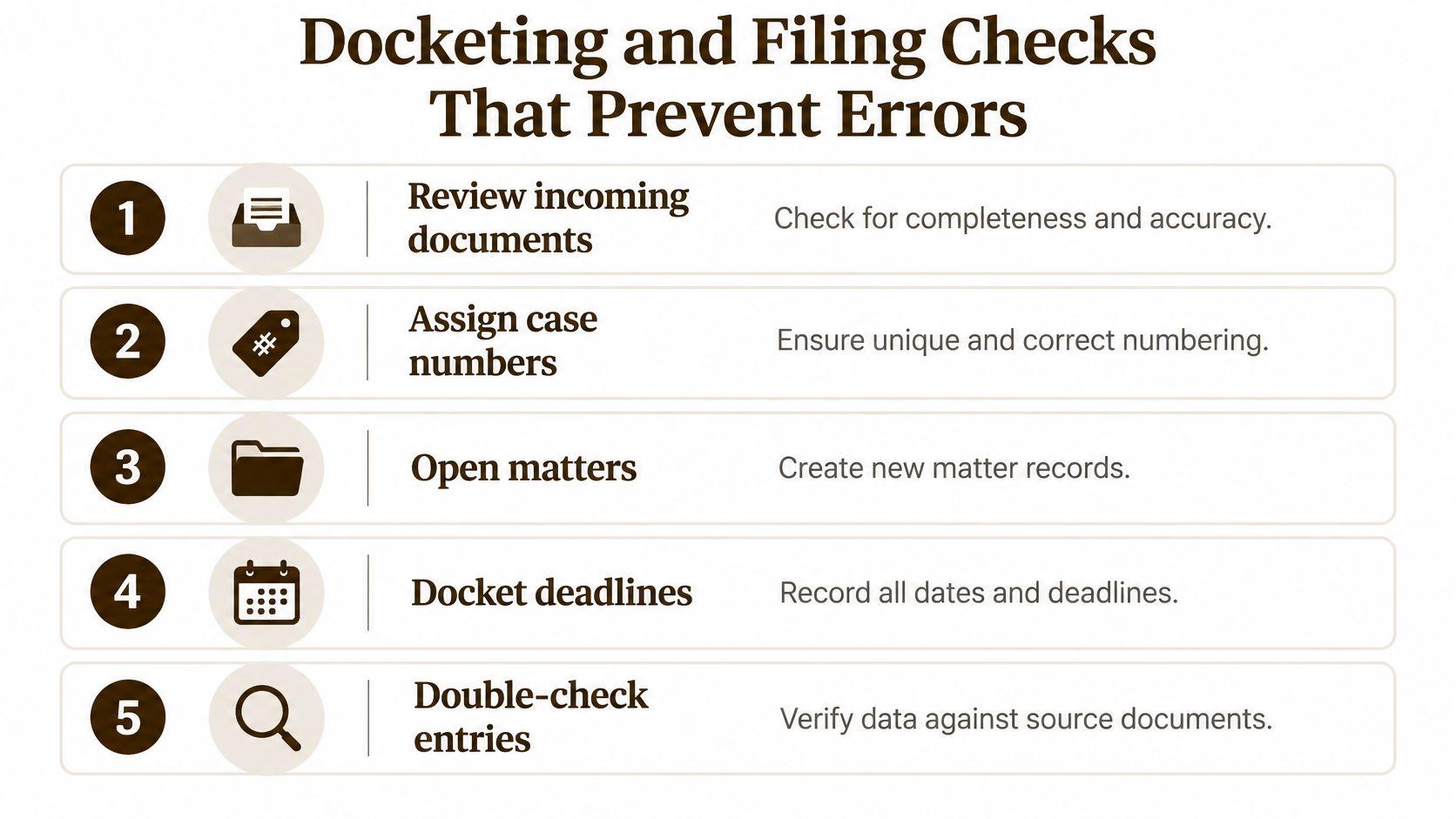
Validate the filing before submission
| Check | What to verify | Consequence if missed |
|---|---|---|
| Matter and document type | Correct case number and filing category | Misrouted service or a filing in the wrong file |
| Signatures and components | Required signatures and attachments are present | Filing rejected or returned |
| Fee or exemption status | Payment or exemption is recorded | Delayed processing |
| Docket description | Concise entry that matches the document | Search and deadline errors |
| Event linkage | Filing linked to the correct case event | Incomplete official record |
| Audit trail | Who filed, when, and what changed | Inability to prove what was filed and when |
Say a motion is submitted under the wrong case category. If the error prevents normal routing, the responsible judicial staff may not see it when expected, leaving the parties to discover the problem as a response deadline approaches. The clerk should escalate the mismatch promptly, not replace information and erase the history.
An audit trail is the retained record of actions and changes. Preserve submission confirmations, acceptance or rejection notices, and correction records according to office procedure.
Clerks can explain filing procedures and help users use electronic systems without advising them which legal argument to make. Written support staff standards help define that boundary and identify who resolves substantive questions.
Before submission, complete each validation check and record who performed it. Where a check requires attorney judgment, obtain that approval instead of treating a blank field as permission to proceed.
Retention, Access and Confidentiality Controls
Access control starts with the requester, not the document's location. Before sharing a file, confirm that the person is authorized for that matter and use the approved delivery method. A familiar name or an internal email address isn't a substitute for checking restricted access.
The U.S. Courts' operations guidance assigns responsibilities that include monitoring record access, maintaining accurate filing, retrieving and certifying documents, and checking required documents and deadlines before closure. In a law firm, certification authority and other court-specific duties shouldn't be assumed. The useful principle is lifecycle control: responsibility continues after intake.
Reconcile before closing the matter
Reconciliation means comparing the file's contents with the docket or other authoritative activity record. Identify missing documents, investigate mismatched dates and confirm that completed actions have supporting records.
Say a closed matter appears to be missing a response letter. A reconciliation check finds it attached to an email but absent from the matter repository. The clerk saves the approved record with its transmission information, rather than marking the file complete because the letter exists somewhere.
A workable law-firm control model includes:
- Consistent naming: Use the approved matter identifier, document description and date format.
- Restricted permissions: Apply client and ethical access requirements to folders and shared copies.
- Version and transmission histories: Distinguish drafts from signed documents and retain evidence of sending.
- Assigned deadline responsibility: Record filing and response dates through the approved calendaring process.
- Periodic comparison: Investigate gaps between recorded activity and stored documents.
Authorize disposition rather than clearing space
Retention determines how long records must be kept. Disposition is their authorized final treatment, such as destruction or archival transfer. A retention trigger is the event that starts the applicable retention period, such as matter closure under the office's schedule.
Don't calculate a destruction date from the document's age alone. Confirm the record category, applicable trigger and any preservation hold that suspends routine destruction.
Before releasing a file: Confirm reconciliation, check for preservation restrictions, and obtain written authorization under the retention schedule.
Moving files to storage also requires a searchable inventory. Otherwise, the office has changed the location without preserving usable access.
Which Tasks Automation Is Taking Over and What Skills Follow
The U.S. Bureau of Labor Statistics projects general-office-clerk employment to decline 6% from 2025 to 2035, reflecting automation and digitization pressures. That broader occupational projection isn't a law-firm hiring forecast, but it gives candidates a reason to develop skills beyond manual sorting.
The changing workspace combines document-handling tools with human review.

Software can sort records by preset rules, detect possible duplicates and extract text. Optical character recognition, or OCR, converts scanned page images into machine-readable text. Metadata extraction captures descriptive fields, such as document date or matter number, but a populated field isn't necessarily a correct field.
Separate processing from judgment
The exposure levels below are practical task comparisons, not measured replacement probabilities.
| Task | Automation exposure | Human judgment still needed |
|---|---|---|
| Sorting by alphabetical, numerical or date rules | High | Confirming the rules fit the matter |
| Duplicate detection | High | Deciding which copy is the official record |
| OCR and metadata extraction | High | Checking scan quality and correcting fields |
| Classifying ambiguous documents | Medium | Resolving unclear document types |
| Flagging privileged or sensitive material | Low | Applying client confidentiality rules |
| Handling system exceptions | Low | Escalating anomalies to a supervisor |
An automated system might read the date on an attached exhibit as the date of the covering letter. A clerk must recognize the mismatch and correct the field without altering the underlying document. Likewise, software can flag potentially privileged material, but the clerk should route uncertain legal determinations to the designated reviewer.
For another format on the topic, the video follows.
Build skills around exceptions
Practise Excel filtering and validation, database searches, document-system permissions, metadata correction and scan-quality review. Learn how the office's matter-management systems connect documents to assignments and responsibilities, rather than treating each folder as an isolated container.
Cybersecurity and privacy awareness belong in that practice too. Don't upload client records to an unapproved OCR service or AI tool just because it processes documents conveniently.
Choose two skills, such as metadata checking and spreadsheet validation, and practise on fictional documents. Introduce a mismatched matter number, an unreadable page and an apparent duplicate, then document how you would resolve or escalate each exception.
Deciding Whether the Filing Clerk Role Fits You
A filing clerk who catches a mislabeled exhibit before it reaches the court has protected a deadline, not just tidied a folder. That is the lens to use when judging fit. The role suits people who find satisfaction in accurate, repeatable work and can stay attentive when documents look similar. You will handle confidential material daily and move constantly between paper records and screens. If repetitive checking drains your attention or you need constant novelty, read the actual assignment carefully before accepting.
Check your working habits
Rate yourself against these statements:
- I can follow a numbered routine independently. A correct previous batch is not a reason to skip the next check.
- I notice small mismatches. A misspelled party name, inconsistent date or missing attachment makes me pause.
- I can work in a document-management system. I am willing to learn search fields, permissions and correction procedures.
- I escalate appropriately. Spotting an error does not always mean I am authorized to fix it alone.
The last two statements carry more weight as automation grows. Software now handles routine classification, so the clerk's remaining value concentrates in judgment calls about exceptions and confidentiality. Legal support experience helps you recognize document types, but spreadsheet competence and a clear grasp of confidentiality matter just as much. A focused legal support staff training plan turns those expectations into practice tasks rather than vague requirements.
Compare the assignment, not just the title
Ask who owns court submissions, deadline calculations, retention decisions and access approvals. A posting that combines all four needs clearer boundaries than one limited to scanning and retrieval. Pay for these roles varies by employer, location and experience, so treat the listed responsibilities, not the title, as the basis for any comparison.
Five Star Placements works exclusively in legal and recruits only for law firms and legal departments, not non-legal roles. To assess your next opportunity, compare a current posting against the seven duty groups and count how many it covers, then note any responsibility that lacks a named supervisor or approval process.
Five Star Placements provides legal recruiting and placement for law firms and legal departments, including legal support positions where accurate records handling matters. Visit Five Star Placements to schedule a call about your legal recruitment needs and discuss the filing, retrieval and confidentiality responsibilities your next hire will need to handle.
Need help filling a legal role?
Five Star Placements partners with law firms and legal departments nationwide.
Schedule a Call